
Effects are read only when the program is launched, so any changes to settings or updates to files in the folder require restarting the program.
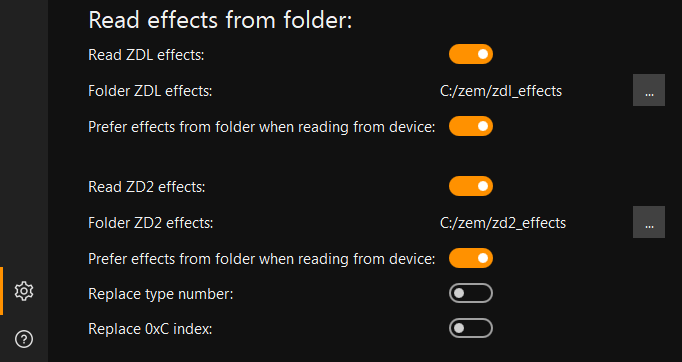
Reading effects from a folder must be enabled in the settings, for each generation of effects (ZDL and ZD2) separately.
You also need to select the folders in which the program will search for effect files.
The "Prefer effects from folder when reading a list from device" setting determines which effects will be selected when there are identical effects in the program and in the folder.
The "Replace type number" and "Replace index 0XC" parameters are required for effects to work with some models. Effect compatibility can be found in table.
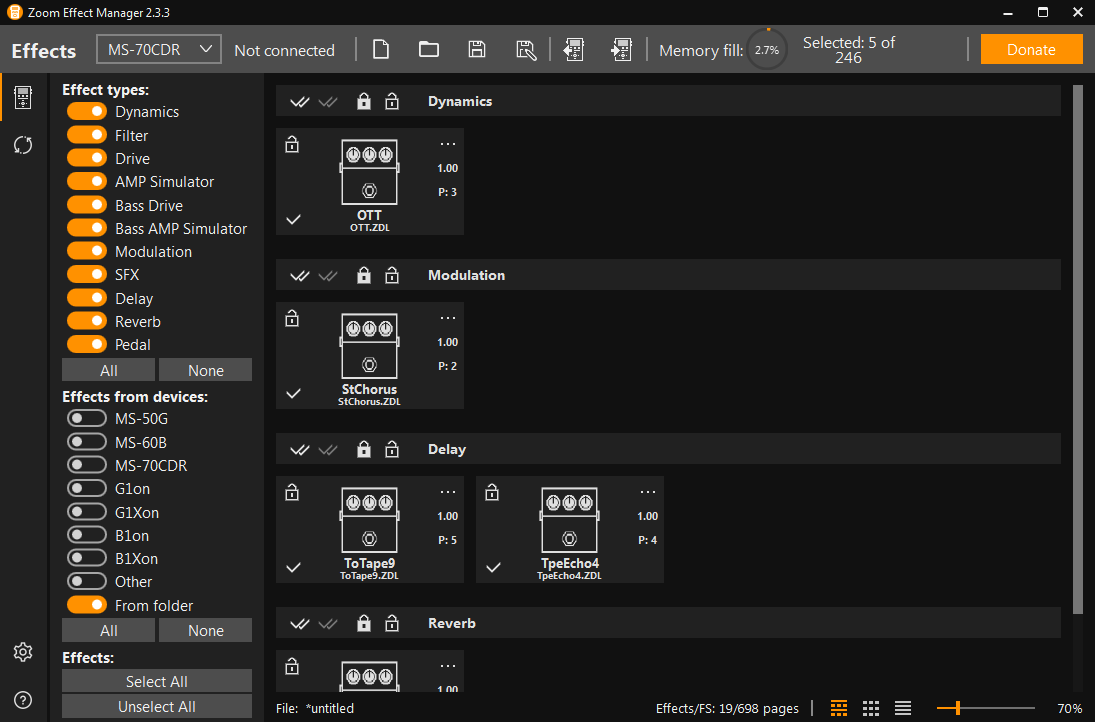
After launching the program and successfully reading the effects from the folder, an additional filter will appear - "From folder", using which you can view all the effects from the folder.
- For all models, the device file name is limited to 12 characters, including the extension, which is 4 characters long. The file name is limited to 8 characters. If the file name is longer than 8 characters, the program truncates it before writing. It's possible that after truncating the file name, some effects will have the same name, causing the pedal to freeze when loading. Name matching checks are planned to be added in future versions of the program.
- For ZD2 effects, all parameters, except for the Russian description, are extracted from the file itself. Additional files (.ZIC and .ZIR) must be placed in the same folder as the effect file. The names of the additional files must match the effect file name.
- For ZDL effects, most parameters are extracted from the file itself. This is sufficient for writing the effect to the pedal.
You can also include a JSON file with some parameters, the JSON file name must match the effect file name. No parameter is required and can be omitted from the file.
The JSON file may contain the following parameters:
"name" - effect name
"inDeviceFileName" - file name in pedal
"iconFile" - effect icon for the program, the name may differ from the effect name
"descriptionEng" - description in English
"descriptionRus" - description in Russian
"dependencies" - array of dependency files, can have values from the list ["CMN_DRV.ZDL","CMN_BASS.ZDL"]. This needs to be specified if the effect does not work without these shared files.
Example of a JSON file:
- For ZD2 files, the icon in the program is read from the ZIC file, from the png file with the same name in the same folder, or from the effect file itself. Please note that there are original effects whose files contain empty or incorrect icons (from other effects), this is common for effect files from models that use ZIC and SVG icons.
Example debug log:
Reading effects from a folder must be enabled in the settings, for each generation of effects (ZDL and ZD2) separately.
You also need to select the folders in which the program will search for effect files.
The "Prefer effects from folder when reading a list from device" setting determines which effects will be selected when there are identical effects in the program and in the folder.
The "Replace type number" and "Replace index 0XC" parameters are required for effects to work with some models. Effect compatibility can be found in table.
After launching the program and successfully reading the effects from the folder, an additional filter will appear - "From folder", using which you can view all the effects from the folder.
How effects are read from a folder
- Files are read recursively, meaning you can create subfolders with effects.- For all models, the device file name is limited to 12 characters, including the extension, which is 4 characters long. The file name is limited to 8 characters. If the file name is longer than 8 characters, the program truncates it before writing. It's possible that after truncating the file name, some effects will have the same name, causing the pedal to freeze when loading. Name matching checks are planned to be added in future versions of the program.
- For ZD2 effects, all parameters, except for the Russian description, are extracted from the file itself. Additional files (.ZIC and .ZIR) must be placed in the same folder as the effect file. The names of the additional files must match the effect file name.
- For ZDL effects, most parameters are extracted from the file itself. This is sufficient for writing the effect to the pedal.
You can also include a JSON file with some parameters, the JSON file name must match the effect file name. No parameter is required and can be omitted from the file.
The JSON file may contain the following parameters:
"name" - effect name
"inDeviceFileName" - file name in pedal
"iconFile" - effect icon for the program, the name may differ from the effect name
"descriptionEng" - description in English
"descriptionRus" - description in Russian
"dependencies" - array of dependency files, can have values from the list ["CMN_DRV.ZDL","CMN_BASS.ZDL"]. This needs to be specified if the effect does not work without these shared files.
Example of a JSON file:
{
    "name": "RainSel",
    "inDeviceFileName": "RAINSEL.ZDL",
    "iconFile": "Rain.png",
    "descriptionEng": "Text",
    "descriptionRus": "Текст",
    "dependencies": ["CMN_DRV.ZDL","CMN_BASS.ZDL"]
}
- For ZDL effects, the icon in the program is read from a png file with the same name in the same folder, or from an icon file specified in the JSON file.- For ZD2 files, the icon in the program is read from the ZIC file, from the png file with the same name in the same folder, or from the effect file itself. Please note that there are original effects whose files contain empty or incorrect icons (from other effects), this is common for effect files from models that use ZIC and SVG icons.
Effects reading log
If the "Write debug log" option is enabled in the settings, you can view errors and effect reading parameters in the log. The log file is located in the documents folder\Zoom Effect Manager\logs\Example debug log:
12:14:14 - ------------------------------------------
12:14:14 - Start reading effects ZDL from folder
12:14:14 - ------------------------------------------
12:14:14 - Start reading file C:/zem/zdl_effects/OTT.ZDL
12:14:14 - Name: OTT
12:14:14 - Effect index: 16777626
12:14:14 - Effect IndexHex: 0x0100019a
12:14:14 - Type Number: 1
12:14:14 - Type: Dynamics
12:14:14 - Version: 1.00
12:14:14 - In device file name: OTT.ZDL
12:14:14 - Byte size: 10366
12:14:14 - Page size: 3
12:14:14 - Icon file not found
12:14:14 - Json not found
12:14:14 - Effect added
12:14:14 - Completed reading file

12:14:14 - ------------------------------------------
12:14:14 - Start reading effects ZD2 from folder
12:14:14 - ------------------------------------------
12:14:14 - Start reading file C:/zem/zd2_effects/160_COMP.ZD2
12:14:14 - Name: 160 Comp
12:14:14 - Effect index: 16777288
12:14:14 - IndexHex: 0x01000048
12:14:14 - Type: Dynamics
12:14:14 - Type Number: 1
12:14:14 - Version: 1.00
12:14:14 - Description: This compressor is in the style of the dbx 160A
12:14:14 - In device file name: 160_COMP.ZD2
12:14:14 - Byte size: 15907
12:14:14 - Page size: 4
12:14:14 - ZIC file not found
12:14:14 - Icon reading from file completed
12:14:14 - ZIR file not found
12:14:14 - Effect added
12:14:14 - Completed reading file